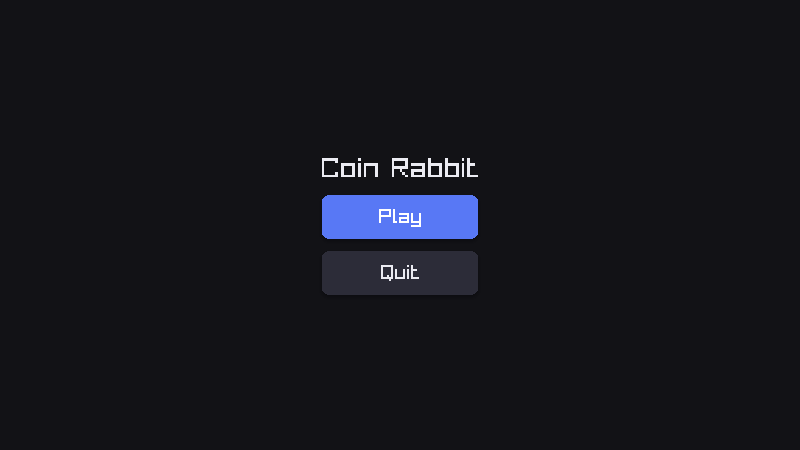
Your first scene
A scene is one screen of the game: the main menu is a scene, the level is a scene,
a pause menu is a scene. The game rmp new made has one, a menu. This page replaces it
with your own and adds a second one for Play to go to.
Where the game starts#
Open src/main.cpp. You will not change it in this tutorial, and it is worth
reading once:
// Your game starts here, and this is all of it.
//
// RMP_GAME opens the window from [window] in raylib_multiplatform.toml, enters
// the scene you name, runs it every frame, and shuts everything down on the way
// out — on every target, including the two where main() is not a main() at
// all. Your work is in src/scenes/ and src/objects/.

#include <rmp/app.h>

#include "scenes/main_menu.h"

RMP_GAME(MainMenuScene);
RMP_GAME is the whole program. It opens the window
described in raylib_multiplatform.toml, enters the scene you name, runs it every
frame, and closes everything on the way out. There is no InitWindow() and no frame
loop in your code because the platforms do not agree on who owns the loop: on the desktop it is a
while in main(), in the browser it is the browser, and on iOS it is
UIKit. The macro writes the right one for each, so your code is the same everywhere.
The scene is named here, in C++, and not in the .toml. A name in a text file
would have to be turned into a type at run time, and the usual way to do that in C++, a global
that registers itself, is exactly what a linker throws away from a library when nothing refers to
it, and the result is a game that runs on your desktop and finds no scenes on a phone. Naming the
type means a typo is a compile error instead.
Name the game#
rmp new named the window after the folder. Give the game its real name in
raylib_multiplatform.toml, under [window]:
[window]
title = "Coin Rabbit"
The title goes in the window's title bar on the desktop, and under the app's icon on Android
and iOS. The values your code can use reach it as macros, written again on every build from the
.toml: this one is RMP_WINDOW_TITLE, and the menu below shows it. You
never include anything to get them; every header of the framework brings them along.
The menu#
A scene is a class that derives from rmp::Scene and
overrides the hooks it needs. Replace the whole of the template's menu, header first:
#pragma once
// The title screen: the game's name, Play and Quit.

#include <rmp/scene.h>

class MainMenuScene : public rmp::Scene {
public:
    void _draw() override;
};
The menu needs one hook, _draw(), which runs
every frame, in screen space. The underscore is a rule that holds across the whole framework: a
method whose name starts with _ is one the framework calls on your type. You
override it; you never call it yourself.
Then the code, which replaces src/scenes/main_menu.cpp:
#include "main_menu.h"

#include "game.h"

#include <rmp/app.h>
#include <rmp/ui.h>

void MainMenuScene::_draw() {
    rmp::ui::begin();
    rmp::ui::text(RMP_WINDOW_TITLE, { .size = rmp::ui::Size::LARGE });
    if (rmp::ui::button("Play", { .style = rmp::ui::Variant::PRIMARY })) {
        rmp::Scene::change<GameScene>();
    }
#if !defined(PLATFORM_IOS)
    if (rmp::ui::button("Quit")) rmp::app::quit();
#endif
    rmp::ui::end();
}
Everything between rmp::ui::begin() and
rmp::ui::end() is laid out as a column in the middle
of the screen, which is what a menu is. Nothing in it says where, or how big: the layout is
worked out at the size you set in [window] and scaled to the real window, so the
same menu fits a phone and a 4K monitor. A mouse, a finger, the keyboard and a gamepad all work
it, with nothing written for any of them.
rmp::ui::button() draws a button and returns
true on the frame it is pressed, so the button and what it does are one line. The
braces after a label are an options struct written with designated initialisers:
{ .style = rmp::ui::Variant::PRIMARY } marks Play as the button to press. C++20
wants the fields in the order the struct declares them, and every options struct in the framework
is ordered the way they are usually written.
rmp::Scene::change<GameScene>() ends
this scene and starts a GameScene. It does not happen on that line: it happens when
the frame ends. The call is made from inside the menu's own _draw(), and destroying
the menu right there would pull it out from under the code that is still running in it.
rmp::app::quit() asks the game to close. It
lets the frame finish and then shuts everything down in order, which is why it is not
exit(). On iOS it closes nothing, because Apple rejects an app that closes itself:
it writes a warning to the log, once, and returns (with [dev] strict on, a debug
build stops at that warning, as at any other). The #if hides the button there rather
than leave one that does nothing.
The menu's test#
The
game rmp new made also came with a test of its menu, in
tests/game/main_menu_test.cpp. It makes the menu with no window, runs its
_ready(), and checks that every file the menu asked for was found. A menu that asks
for none passes, with a warning that the test checked nothing — and yours loads nothing yet: the
rabbit comes back later. Keep the check, and leave the warning out:
// The main menu finds every file it loads: a file renamed in resources/ and
// not in the code leaves a hole in the picture rather than a crash, and this
// says which.

#include <doctest.h>

#include <rmp/assets.h>

#include "scenes/main_menu.h"

TEST_CASE("the main menu finds every file it loads") {
    const int failed = rmp::assets::failed_loads();

    MainMenuScene menu;
    menu._ready();

    CHECK(rmp::assets::failed_loads() == failed);
}
A test is the one place that calls a hook itself: it stands in for the framework. Every file
in tests/game/ is built with your game — everything in src/ but
main.cpp — and run with no window by rmp test unit, and by CI.
Testing has the rest.
A second scene#
Play goes to GameScene, which does not exist yet. Make two new files in
src/scenes/, a header and its code:
#pragma once
// The game. For now, a screen that says so and a way back.

#include <rmp/scene.h>

class GameScene : public rmp::Scene {
public:
    void _draw() override;
};#include "game.h"
#include "main_menu.h"
#include <rmp/ui.h>
void GameScene::_draw() {
rmp::ui::begin();
rmp::ui::text("The game goes here.");
if (rmp::ui::button("Back")) rmp::Scene::change<MainMenuScene>();
rmp::ui::end();
}The game has nothing in it yet: a line of text, and a way back. Each scene's header includes
only <rmp/scene.h>; it is the .cpp files that include each other's
headers, which is what lets two scenes name each other without a circle of includes.
Nothing else needs to know the new files exist. Every .cpp under src/
is compiled, on every platform, so adding a scene is adding its files.
The hooks#
These are all the hooks a scene can override. Each has an empty default, so a scene writes only the ones it uses.
| Hook | Runs |
|---|---|
_ready() | Once, when the scene starts. The window exists by then, so this is where a scene loads what it needs. |
_update(float delta) | Every frame, before anything is drawn. delta is the seconds since the last frame. |
_draw() | Every frame, after the scene's objects have been drawn, in screen space. |
_suspend() and _resume() | When another scene is put on top of this one, and when it comes off again. |
_end() | Once, when the scene ends for good. |
The Scenes chapter of the manual has the rest: the
stack of scenes, and passing data from one to the next. The
Interface chapter has the rest of rmp::ui.
Run it#
rmp runThe menu has the game's name, Play takes you to the game screen and Back brings you to the
menu again. Try it without the mouse: the first button of each screen already has the focus, so
Enter presses it, and the up and down arrows move between buttons. The template's
rabbit.png is still in resources/, unused for now: it comes back as the
player.