Dialogue
A conversation is written in a .yarn file in resources/, in
Yarn Spinner's language, version 3, and run by an
rmp::Dialogue. The framework compiles it with a
compiler of its own — a port to C++ of Yarn Spinner's official one — and steps it with a small
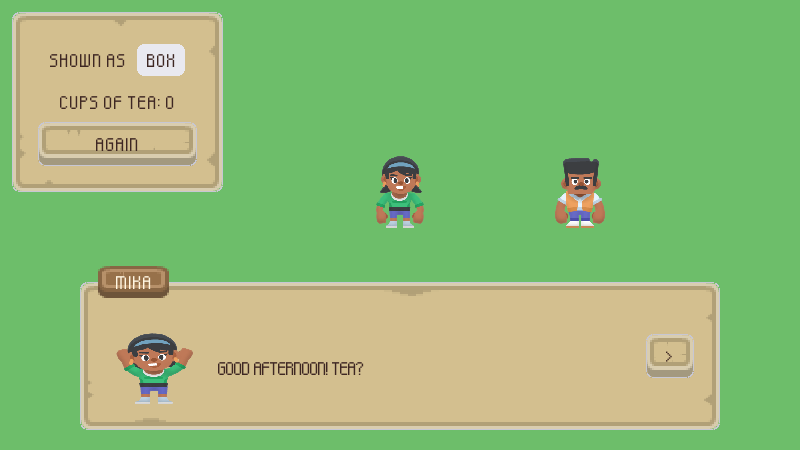
machine: the game shows the lines, offers the choices and answers the commands. Drawing it is a
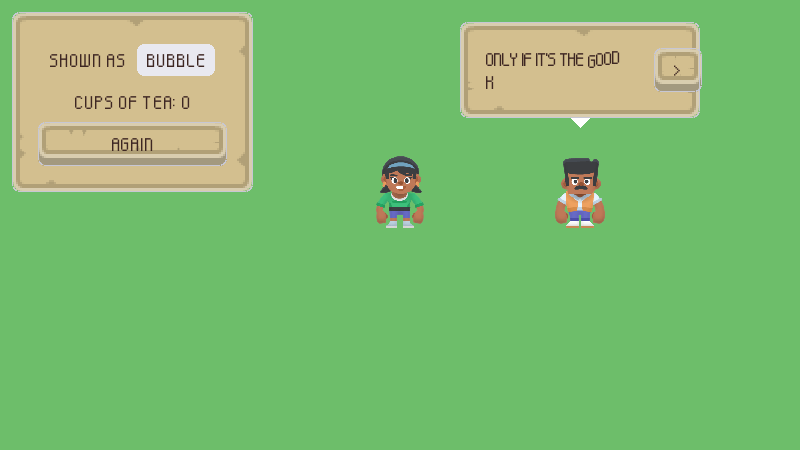
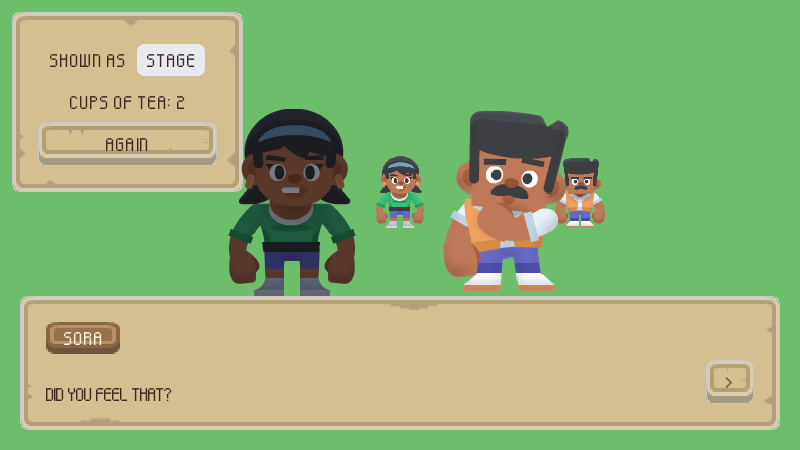
separate piece, so the same conversation can be a box at the bottom of the screen, a bubble over
a head, a visual novel's stage, or something the game draws itself. The header is
rmp/dialogue.h.
A script#
title: Start
---
<<declare $gold = 10>>
<<declare $met = false>>
Mika: Welcome, traveller. #line:welcome #mood:happy
<<if $met>>
    Mika: Back again? #line:again
<<else>>
    Mika: I have not seen you before. #line:first
    <<set $met = true>>
<<endif>>
Mika: What will it be? You have {$gold} gold. #line:ask
-> Buy a [wave]potion[/wave] <<if $gold >= 5>> #line:buy
    <<set $gold -= 5>>
    <<give_item potion>>
    Mika: A fine choice. #line:fine
-> Ask about the tower #line:tower
    <<jump Tower>>
-> Leave #line:leave
    Mika: Safe travels. #line:safe
===
title: Tower
---
Mika: [shake]Nobody[/shake] comes back from the tower. #line:nobody
<<if visited("Tower") == false and has_key()>>
    Mika: But you have the key... #line:key
<<endif>>
===
Each node has a title: and its body between --- and ===.
Mika: names the speaker. {$gold} is the value of a variable, written
into the line. [wave]…[/wave] is markup the presenters draw. #line: is the
line's id, the key of its translation, and any other #tag travels with the line for
the game to read. -> lines are the choices, each with its body indented under it;
<<if …>> after a choice makes it available only when the condition holds.
give_item is a command of the game's, and has_key() a function of the
game's. Yarn's own documentation is the reference for the language; what the framework runs of it
is below.
Running it yourself#
rmp::Dialogue talk = rmp::assets::load_dialogue("wizard.yarn");
talk.start("Start");

// every frame:
if (talk.has_line()) {
    say(talk.line().speaker, talk.line().text); // "Mika", "Welcome, traveller."
    if (rmp::input::just_pressed("accept")) talk.advance();
} else if (talk.has_options()) {
    for (const rmp::DialogueOption &o : talk.options()) offer(o.text, o.available);
    if (rmp::input::just_pressed("accept")) talk.choose(picked);
}
rmp::assets::load_dialogue() reads and
compiles the file. A script with a mistake gives a Dialogue that is not
loaded(), and
errors() says what is wrong, a line each, as
file:line:column: what; they are in the log too and, in a debug build, on screen.
Several files compiled together can jump from one to another:
const std::string_view files[] = { "town.yarn", "school.yarn", "endings.yarn" };
rmp::Dialogue story = rmp::assets::load_dialogue(files);
At any moment the dialogue is waiting for one of three things, or for nothing once it has finished:
- A line —
has_line().line()is anrmp::DialogueLine: itsid, thespeaker, thetextin the current language with the speaker and the markup taken out, where themarkupwas, and itstagswithout the#.advance()goes on. - A choice —
has_options().options()arermp::DialogueOptions, and one whose condition failed is there withavailablefalse: show it greyed out, or not at all.choose(i)takes the one at that place. - A command nobody handles —
has_command()and its text incommand(); the game does what it says and callsadvance(). A command with a handler (below) never waits.
running() is true from
start() to the end of the conversation or a
stop(), and
node() is the node it is in. A Dialogue is moved,
never copied: keep it in the scene that shows it, or in a Talker.
The game's commands and functions#
A script asks the game to do something with a command, <<walk Mika door>>,
and asks it a question with a function in an expression, has_item("key"). The game
answers both by name, with a lambda whose parameters say what it takes:
// has_item("key") in an expression: a string in, a bool out.
talk.on_function("has_item", [](std::string item) -> bool { return carries(item); });
// <<walk Mika door>>: two words, as two strings.
talk.on_command("walk", [](std::string who, std::string where) { walk_to(who, where); });
// <<quake 2.5>>: a number.
talk.on_command("quake", [](float strength) { shake_camera(strength); });
A parameter is a number (float, int, double or any other
arithmetic type), a bool, a string (std::string or
std::string_view), or an rmp::DialogueValue,
which takes anything. A function returns one of the same. Each is checked before the call: a
script that gives has_item() two arguments, or a number where its string goes, or a
<<quake>> a word that is not a number, is a mistake said once — in the
log, on screen in a debug build, and in errors()
— and the call is not made. Write the result's type (-> bool): it is what
rmp yarn ysls tells the editor.
The untyped forms take every argument as it comes, for a function or a command that takes any number of them:
talk.on_command("give", [](std::span<const std::string> words) {
    for (const std::string &item : words) give(item);      // <<give potion map key>>
});
talk.on_function("sum", [](rmp::DialogueValue &result,
                           std::span<const rmp::DialogueValue> args) {
    float total = 0;
    for (const rmp::DialogueValue &a : args) total += a.as_number();
    result = total;                                          // sum(1, 2, 3)
});
A command's words are what follows its name, with its {expressions} filled. A
command nobody handles does not run anything: the dialogue waits on it in
has_command(), for a game that reads
command() itself; the presenters pass it.
Yarn's own functions are built in: visited(), visited_count(),
random(), random_range(), dice(), round(),
round_places(), floor(), ceil(), inc(),
dec(), decimal(), int(), format_invariant() and
the conversions string(), number() and bool(). Their random
numbers come from rmp::random, so a
scripted run of the game is reproducible. There is no overloading: one name, one function.
Checked before it runs#
start() looks at every function the script
calls, in every node, and says each one that is neither built in nor registered — when the
conversation starts, not at the line that calls it an hour into the game. Register the game's
functions before the first start(). What goes wrong while it runs — a node a
<<jump>> names that is not there, a call of the wrong kind — is said the
same way, once, and kept in errors(). rmp yarn check
finds all of it before the game is even built.
Commands that wait#
A command that takes time — someone walking to the door, a door opening, a camera panning — holds the conversation until it is over. Its handler starts it and says when it is done:
talk.on_command("walk", [&](std::string where) {
    mika.walk_to(where);
    talk.wait_until([&] { return mika.arrived(); });   // asked once a frame
});
talk.on_command("pause", [&](float seconds) { talk.wait(seconds); });
From inside a command's handler, wait(seconds)
holds the dialogue for that long, and wait_until(done)
until done() is true; called anywhere else, either is a mistake said once. Yarn's own
<<wait 2>> does the first by itself, when the game has no command of
that name. While a command waits there is no line and no choice: the presenters draw nothing and
show() stays true, and the world is seen doing what the command started.
waiting() says whether a command holds it,
and asking is what moves it on — the presenters ask every frame, and so does a game's own loop:
if (talk.waiting()) {
    // nothing to show: the world goes on
} else if (talk.has_line()) {
    // ...
}
Time is counted once a frame however often it is asked, from the step the scenes get, so a
script waits the same in every run. advance() past a wait goes on at once: a skip
button. A conversation shown over a world that is paused under it (a DialogueBox in a
pushed scene) can wait on time, but never on something in that world: nothing there moves.
examples/games/09_after_school shows its conversations in the town's own scene, so
Mika can walk to the pond while the dialogue waits.
Variables, and saving them#
talk.set_variable("$gold", 25);                 // before the script reads it
const float gold = talk.variable("$gold").as_number();
const int times = talk.visits("Tower");         // what visited_count("Tower") says

rmp::Value state;
talk.save(state);                               // variables, visits, what was seen once
rmp::Value saved;
saved["talk"] = state;
rmp::save::write("slot1", saved);

// and when the game starts again:
rmp::save::read("slot1", saved);
talk.load(saved["talk"]);
save() puts everything the conversation
remembers — its variables, how many times each node was visited, which <<once>>
blocks and line groups have been seen — into an rmp::Value,
and load() takes it back, so a conversation
picks up where the player left it with rmp::save. A
variable a script declares has the type of its declaration; one the game sets has the type of
the value.
The game's own variables#
A variable the game keeps — the gold in the player's purse, the hour of the town's clock — is bound instead of copied: the script reads it and writes it, and there is one of it.
talk.bind("$gold", player.gold);           // int &
talk.bind("$name", player.name);           // std::string &
talk.bind("$met_mika", player.met_mika);   // bool &
talk.bind("$speed", player.speed);         // float &
talk.bind("$hour",                         // or two functions, for a value worked out
          [&](rmp::DialogueValue &out) { out = hour; },
          [&](const rmp::DialogueValue &in) { hour = in.as_number(); });
<<declare $gold = 0>>
You have {$gold} coins.
<<set $gold = $gold - 5>>The script declares a bound variable, with the type it has
(<<declare $gold = 0>>): a binding to one it does not declare, or of
another type — a bool for a number — is a mistake said once, and the script keeps its
own. bind() takes a reference, so the variable
has to outlive the dialogue. save() leaves bound variables out: they are the game's
to save. Several conversations bound to the same variables share them, which is how every person
in 09_after_school knows what the others were told. Bind before the first
start(); a Talker has on_load for it.
Showing it: the presenters#
The interface has three widgets that show a Dialogue, each kept in the scene and shown every
frame between begin() and
end(). They type the line out, offer the choices as
buttons and take the player's answer from the keyboard, a gamepad, the mouse or a finger:
rmp::Dialogue talk = rmp::assets::load_dialogue("wizard.yarn");
rmp::ui::DialogueBox box{
    .portraits = { { .speaker = "Mika", .picture = mika_face } },
    .flow = { .letters_per_second = 40, .blip = "blip" },
};

void _ready() override { talk.start(); }

void _draw() override {
    rmp::ui::begin();
    if (!box.show(talk)) { /* the conversation is over */ }
    rmp::ui::end();
}| Presenter | Looks like | The world under it |
|---|---|---|
DialogueBox | A box along the bottom of the screen, the speaker's portrait and name beside the line, the choices under it: the classic RPG. | waits (pauses_world) |
DialogueBubble | A bubble over
the speaker's head, drawn in the world with rmp::ui::at()
over the object each BubbleSpeaker names, the choices in it. | goes on |
DialogueStage | A visual novel: big portraits of who is on stage, the one speaking in front and the others dimmed, the line in a box under them. | waits |
The same conversation, three ways: examples/ui/10_dialogue
switches between them while it runs, in Kenney's art (CC0) — play it in its page.
pauses_world is a hint for whoever starts the conversation: a box or a stage is
shown in a scene pushed over the game, which then stops under it; a bubble is drawn in the game's
own scene, which goes on. show() returns true while the dialogue has something to
show.
How a line is typed and goes on#
Every presenter has a flow:
letters_per_secondtypes the line out, 0 shows it whole. A press while it types shows the rest at once; the next press goes on. In the line,[speed=2]…[/speed]types those letters twice as fast and[pause=0.4/]waits 0.4 s there.blipis a sound played as the letters appear, everyblip_everyletters: the voice of a character who has no recorded voice.voicesplays a recorded line: the sound namedvoicesplus the line's id,"vo/"and#line:welcomeplayingvo/welcome.auto_advancegoes on by itself so many seconds after a line is whole, andskip_seenlets a line already read go by at once.choice_secondsgives a choice a timer, drawn as a bar, and when it runs outdefault_choiceis taken — or the first available one, when that one is not.
portraits are chosen by speaker and by the
line's #mood: tag, falling back to the speaker's picture for no mood; a picture is any
Picture — a texture, an atlas region, an Aseprite
sprite or slice, a nine-slice. style, name_style and
choice_style dress the box, the name plate and each choice with the same
Styles as every other widget, so a game's theme and
skins apply. The lines read so far are in ours.history, and a
DialogueBox's toggle_history() shows them in place of the box.
A look and a voice for each speaker#
A Speaker is how one person's lines are shown:
their blip and its pitch, and a Style over the presenter's for their box and their
name plate. A field left unset is the presenter's.
rmp::ui::DialogueBox box{
    .speakers = { { .name = "Mika", .blip = "blip_high", .pitch = 1.25f,
                    .name_style = { .tint = Color{ 226, 92, 92, 255 } } },
                  { .name = "Sora", .pitch = 0.85f,
                    .style = { .background = Color{ 30, 40, 80, 230 } } } },
    .flow = { .blip = "blip", .blip_jitter = 0.06f },
};
A speaker with no blip of their own uses the flow's, at their pitch;
blip_jitter moves each blip's pitch by up to that much (0.06 is 6 %), so a voice
made of one sound does not drone. A BubbleSpeaker has the same blip,
pitch and style.
The box's layout#
rmp::ui::DialogueBox box{
    .width = 640,                                     // 0: as wide as it is given
    .portrait_size = 96,                              // design units, square
    .portrait_side = rmp::ui::DialogueSide::RIGHT,    // or LEFT
    .name_offset = { 18, -16 },                       // the plate on the frame's edge
    .choices = rmp::ui::DialogueChoices::ABOVE,       // IN_BOX, ABOVE or CENTER
};
name_offset moves the name plate out of the column and over the frame's top-left
corner, so the line has the box to itself; { 0, 0 } puts it above the line.
choices shows the choices in the box in place of the line, in a panel of their own
above the box at its right, or in a panel in the middle of the screen. height fixes
the box's height, 0 being what the line needs.
A bubble's tail#
A bubble drawn over its speaker has a tail pointing down at them, tail design
units tall and twice as wide, in the bubble's background colour — or tail_color, or a
picture of the game's art in its place, tail_picture. tail = 0 has none.
A bubble with nobody to point at, drawn where the game put it, has no tail either.
The stage's entrances, focus, shakes and flashes#
rmp::ui::DialogueStage stage{
    .enter_seconds = 0.3f, .enter_offset = 80,      // slides in from its side, and fades in
    .focus_seconds = 0.15f, .focus_lift = 10,       // the speaker comes forward...
    .focus_scale = 1.04f,                           // ...a little bigger
};
talk.on_command("quake", [&] { stage.shake(12, 0.4f); });
talk.on_command("flash", [&] { stage.flash(WHITE, 0.3f); });
Whoever speaks for the first time comes on stage: the first half of the cast slides in from
the left, the rest from the right, fading in. The speaker comes forward — full colour, raised,
bigger — and whoever stops speaking goes back to dimmed, over
focus_seconds. shake()
shakes the whole stage, dying away, and
flash() turns the screen a colour and
back: what a game's commands call. A slanted box, a torn edge, a frame like a comic's are art: a
Skin of nine-slices or Aseprite slices on style.
A presenter of your own#
When none of the three is the layout a game wants, it writes its own around the two pieces they are made of:
const rmp::ui::DialogueFlow flow{ .letters_per_second = 40, .blip = "blip" };
rmp::ui::begin({ .placement = rmp::ui::Align::BOTTOM_CENTER, .grow = true });
rmp::ui::row({ .gap = 16, .grow_x = true }, [&] {
    rmp::ui::image(face, { .width = 120, .height = 120 });
    rmp::ui::column({ .grow_x = true }, [&] {
        rmp::ui::dialogue_line(talk, memory, flow);       // the line, typed out
        rmp::ui::dialogue_choices(talk, memory, flow);    // or the choices
    });
});
rmp::ui::end();
dialogue_line() draws the line where the
call is — its markup, the typewriter with its [speed] and [pause], the
blips and the recorded voice, auto-advance, skip-seen, and the > button that goes
on — and is true while there is a line;
dialogue_choices() draws the choices and
a timed choice's bar, true while there are choices. Both pass a command nobody handles and draw
nothing while a command waits. The DialogueMemory
is what they remember between frames: keep one, as a presenter does.
Rich text#
The markup of a line is drawn a letter at a time by
rmp::ui::rich_text(), which a game can use for
any text of its own:
rmp::ui::rich_text("A [wave]strange[/wave] [color=#ffcc00]light[/color], [b]now[/b]!");
rmp::ui::rich_text("[rainbow]You win![/rainbow]", { .width = 300, .visible = 4 });
[b] is bold, [color=#rrggbb] or [color=red] a colour,
[size=30] a size in design units, and [wave], [shake] and
[rainbow] move or colour their letters by the interface's clock.
visible shows that many letters and holds the rest back: a typewriter counts it up
to rich_text_length().
Someone to talk to: Talker#
rmp::behavior::Talker is the behavior of a
character who talks. When the player is within range and presses action
— or as soon as it arrives, with an empty action — it loads its dialogue, starts it
at node and hands it to on_talk, where the game shows it:
auto &mika = spawn({ .position = { 200, 120 }, .size = { 16, 16 } });
mika.add<rmp::behavior::Talker>({
    .dialogue = "wizard.yarn",
    .node = "Start",
    .range = 32,
    .player = player_handle,
    .on_talk = [](rmp::Dialogue &talk) { rmp::Scene::push<Talking>(talk); },
});
The scene it pushes keeps a reference to the conversation, shows it with a box or a stage, and
pops itself when show() returns false. The Dialogue belongs to the Talker, so its
variables and visits stay with the character between conversations, and once makes
it talk a single time. in_range() is for the prompt over its head — "Talk", with
rmp::ui::at() — and talking() says a conversation is running. A level
designer places one in LDtk with the fields dialogue, node,
range and once, read by Talker::from(), as every
behavior from the editor.
A Talker loads its file the first time it is asked to talk. on_load is called
then, before the first line, with the dialogue: where the game binds its variables and registers
its functions and commands, so that the first line already sees them.
npc.add<rmp::behavior::Talker>({
    .dialogue = "school.yarn",
    .player = hero,
    .on_load = [&](rmp::Dialogue &talk) { talk.bind("$gold", gold); },
    .on_talk = [](rmp::Dialogue &) { /* show it */ },
});
examples/games/09_after_school is
a whole story told this way, playable in its page: a Talker per person of an LDtk town, a Stage
over the town, every $variable bound to the game's story, a <<walk>>
the dialogue waits on, a timed choice and three endings, in English and Spanish.
Translated like every other text#
A line's #line: id is the key of its translation in the game's
tables, as line:welcome, and
the .yarn holds the text in [lang]
default. rmp text scan adds every line that has an id to
lang.tsv in resources/ with its text in the default language's column, so a translator
fills one table for the menus and the dialogue alike, and rmp text check holds both to
[lang] languages. The text is written the way Yarn Spinner's own string table writes
it: the speaker and the markup stay, the tags and an option's condition go, and each
{expression} becomes a number in order, {0}, {1}, which the
machine fills with its value. Mika: What will it be? You have {0} gold. in the English
column is Mika: ¿Qué será? Tienes {0} de oro. in the Spanish one, and
check fails on a translation that lost a {0}.
Give every line an id. A line without one gets an id made from its file, its node and its place
in the node, which changes when a line is added above it; it is shown, but it cannot be translated
reliably and rmp text scan leaves it out.
Checking the scripts: rmp yarn check#
rmp yarn check                      # every resources/**/*.yarn
rmp yarn check resources/intro.yarn # one
rmp yarn check compiles every script with the framework's own compiler — the same
one the game runs, built for the machine as rmp_yarnc — and says each mistake as
file:line:column: what is wrong. It reads the game's src/ and
include/ for what they register: the typed functions are told to the compiler, so a
script that calls has_item(3) where a string goes fails here, and a function a script
calls that nothing registers is an error — the game would only find it at the line that calls it.
A command nothing handles is a warning, since a game may read it itself. It is a stage of
rmp test and a step of a game's CI, and exits 1 on an error. In the framework, each
example is checked against its own code.
In the editor#
The Yarn
Spinner extension for VS Code highlights the language, draws a script's nodes as a graph and
checks it as it is typed. What it cannot know is the game's own commands and functions, which are
C++. rmp yarn ysls tells it:
rmp yarn ysls # writes rmp.ysls.json next to resources/The file is the extension's own format (a .ysls.json, which it looks for anywhere
in the workspace): each command and function the C++ registers, with its parameters' names and
types, its result, the file it is in, and the // comment just above the registration
as its documentation. The extension then completes them, shows that comment on hover and checks
their arguments. Run it again when a registration changes.
// Whether the player carries `item`: "key", "map", "flyer".
talk.on_function("has_item", [](std::string item) -> bool { return carries(item); });
Any editor that runs a linter gets the same checks from rmp yarn check, whose lines
are file:line:column: message. In Neovim (LazyVim included), with
nvim-lint:
require("lint").linters.rmp_yarn = {
  cmd = "rmp", args = { "yarn", "check" }, stdin = false, append_fname = true,
  stream = "stdout", ignore_exitcode = true,
  parser = require("lint.parser").from_errorformat("%f:%l:%c: %m,%f:%l: %m"),
}
require("lint").linters_by_ft.yarn = { "rmp_yarn" }
Compiled when it loads, or when the game is built#
[dialogue] build says
where a script is compiled:
build = | The scripts are compiled |
|---|---|
"runtime" | when the game loads them, from resources/: edit a
line and load it again. |
"embedded" | when the game is built: the host tool rmp_yarnc
compiles every .yarn of resources/ into the executable, so the game reads
no script and compiles nothing when it starts, and a script with a mistake fails the build with
its file, line and column. On the desktop; a cross build — Android, iOS, the web — compiles at
runtime. |
"auto" (the default) | at runtime in a debug build, embedded in a release. |
The machine is the same in both, so a script behaves the same, and
load_dialogue() is the same call: it looks in the embedded scripts first.
Written in Ink#
python3 tools/ink_to_yarn.py story.ink resources/story.yarnA story written in Ink is converted into a
.yarn file, from its source: knots and stitches become nodes, VAR
declarations, ~ assignments, choices with their conditions and their once-only
*, diverts, -> END and simple conditional text. What Ink has and Yarn
has not — nested choices, tunnels, threads, lists, functions, sequences, glue — is reported with
its line number and kept in the output as a comment, so nothing is lost without a word. The
conversion is done once, by the developer; the game only ever reads Yarn.
What of Yarn runs#
The whole of Yarn Spinner 3: nodes and their headers; lines with ids, tags and shadow lines;
speakers; {expressions} with Yarn's operators; markup, with select,
plural and ordinal by the current language; options and their
conditions; line groups (=>) and node groups (when:), chosen by
saliency (set_saliency());
<<if>>, <<once>>, <<set>> and
<<declare>> with types, enums and smart variables;
<<jump>>, <<detour>> and
<<return>>; visit tracking; and the game's commands and functions. It is
held to Yarn Spinner's own test cases, which the framework runs as they are: every test plan plays
step for step, and every script that must not compile does not. What a later Yarn adds and the
framework does not run yet is listed, with its test, in
tests/dialogue/yarn_unsupported.txt, which is empty today.
Maintaining the dialogue is how that is
kept so.