Localization
Every text the framework draws is an rmp::Text.
A literal you write in the call translates itself: its own words are the key it is looked up by in
the game's tables, and what the tables do not have is shown as written. So the three-function menu
is already translatable, without a line of its own:
rmp::ui::begin();
if (rmp::ui::button("Play")) play();
if (rmp::ui::button("Quit")) rmp::app::quit();
rmp::ui::end();
Add a table with a Spanish column, and a player whose system speaks Spanish sees
Jugar and Salir. Nothing else changes. The header is
rmp/text.h, and rmp/ui.h already includes it.
A literal is translated, a runtime string is not#
The difference is the type, not the words. A string literal written in the call
("Play") is a fixed key: translated. A string made while the game runs — a
std::string, a std::string_view, what TextFormat() returns —
is shown exactly as it is and never looked up, because it has no key that stays the same from one
frame to the next:
rmp::ui::text("High scores");          // translated
rmp::ui::text(player_name);            // the player's name, as it is
rmp::ui::text(TextFormat("%d", score)); // a number, as it is
A literal kept in a std::string_view variable first is a runtime string by then.
Pass the literal straight to the function, or make the rmp::Text where it is
written.
Values go in placeholders#
A text with a value in it keeps its key fixed by naming the value instead of printing it:
rmp::ui::text(rmp::Text("Score: {score}", { { "score", score } }));
rmp::ui::text(rmp::Text("{name} wins in {time} s", { { "name", "Ada" }, { "time", seconds } }));
The key is Score: {score}, whatever the score is, and the Spanish column says
Puntos: {score}. Each rmp::TextArg is a
name and a number or a text. A whole number is written as one (3, and
100000000 for a double that holds it); any other number is written with the fewest
digits that read back as the same number (2.5, 0.1). A text argument goes
in as it is, never translated. {{ and }} are a brace, and a placeholder
with no argument of its name stays as written, braces and all, so a missing value is visible.
A widget's identity is its text's key and context, never the translation, and never the
values: Score: {score} is the same button at every score and in every language, so
the focus, the hover and a click in progress all survive a score that changes and a language that
changes.
Plurals#
When the arguments hold a number, a text can have plural forms, written in one cell with
| between them, in the order of the language's
CLDR plural categories. The
first number among the arguments chooses:
rmp::ui::text(rmp::Text("{count} gem|{count} gems", { { "count", gems } }));| Languages | Forms | Chosen by |
|---|---|---|
| English, Spanish, German, Italian, Dutch, the Nordic languages, Greek, Hungarian, Turkish and others | one|other | one for exactly 1 |
| French, Portuguese, Hindi, Bengali, Persian | one|other | one for 0 and 1 |
| Russian, Ukrainian, Belarusian | one|few|many|other | 1, 21, 31…; 2–4, 22–24…; the rest of the whole numbers; fractions |
| Polish | one|few|many|other | 1; 2–4, 22–24…; the rest; fractions |
| Czech, Slovak | one|few|many|other | 1; 2–4; fractions; the rest |
| Japanese, Chinese, Korean, Thai, Vietnamese, Indonesian, Malay and others | other | the one form there is |
A language not on the list takes the last form written. A | in a text with no
number among its arguments is a character like any other. rmp text check fails on a
cell with the wrong number of forms for its language.
The same words, two meanings#
"Open" a door and "Open" a file are one key in English and two words in many languages. A
context tells them apart: it is a column of the
table, and two rows with the same key and different contexts are two texts.
if (rmp::ui::button(rmp::Text("Open", { .context = "door" }))) { /* ... */ }
if (rmp::ui::button(rmp::Text("Open", { .context = "file" }))) { /* ... */ }
They are two buttons as well: the context is part of the identity.
The tables#
Translations live in resources/, in tab-separated files, and the game can use
either shape or both; they are merged when the game starts.
- One table, a column per language —
lang.tsvinresources/([lang] file). The first row is the header,key,context, then one column per language code, and anunusedcolumn thatrmp text scankeeps:key context en es unused Play Play Jugar Open door Open Abrir {count} gem|{count} gems {count} gem|{count} gems {count} gema|{count} gemas language.name English Español - One file per language —
es.tsvin alangfolder ofresources/([lang] folder): three columns,key,contextand the text, the file's name being the language. A translator can have one file without seeing the others.
A row starting with # is a comment, a cell may hold \t,
\n and \\ for a tab, a new line and a backslash, and a file written on
Windows, with CRLF and a byte-order mark, reads the same. The row language.name is the
language's own name, what a language menu shows. In a debug build on the desktop the tables are
watched: edit a translation, and the next frame shows it.
With [lang] languages
empty, the files of the folder are looked for under the common codes (en,
es, fr, de, pt-BR, ja,
zh-TW and the others of the list in src/rmp/text/text.cpp); a game that ships
another one names it in the list.
Which language#
The game starts in the language the player chose last time, if rmp::lang::set() was ever called; otherwise in the
system's language — the environment on Linux and the BSDs, the preferred languages on macOS and
iOS, the user's locale on Windows, the device's configuration on Android, the browser's language on
the web — and otherwise in [lang]
default. A text is looked up down a chain: es-MX, then es,
then the default language, then the words the code wrote.
With [lang] languages set, the system's language is taken only when it is one of
them (or a chain of it reaches one), so a player is never put in a language the game does not
ship. rmp::lang is the rest:
for (const std::string &code : rmp::lang::available()) {
    if (rmp::ui::button(rmp::lang::name(code))) rmp::lang::set(code); // "English", "Español"...
}
rmp::ui::text(rmp::Text("Language: {name}",
                        { { "name", rmp::lang::name(rmp::lang::current()) } }));
set() changes every screen at once — the next
frame draws in it, nothing is reloaded — and saves the choice with
rmp::save, so the next run starts in it.
available() is [lang] languages in
its order, or every column and file the tables have.
translate() is the text of a key in the current
language, for a place that is not the UI's — a window of your own, a texture drawn with raylib.
A font per language#
The interface bakes the letters a text needs when it first draws them, so any alphabet works
with a font that has its glyphs — Cyrillic, Greek, Chinese, Japanese, Korean. A language whose
alphabet the [ui] font lacks gets
a font of its own:
[lang]
languages = ["en", "es", "ja"]
fonts = { ja = "NotoSansJP.ttf" }
The interface changes to it when the language changes, and back to the [ui] font
for a language with none. Right-to-left and complex shaping — Arabic, Hebrew, the Indic scripts —
are not supported: their letters are drawn left to right, one by one.
A menu of languages, each in its own letters#
A language menu shows every language's name at once, whatever the language is: 日本語 has to be
drawn in a font with kanji while the interface is in English, and Español in one with ñ while it is
in Japanese. A button's Style names its font:
rmp::Font japanese = rmp::assets::load_font("jp.ttf", 16);
rmp::Font latin = rmp::assets::load_font("font.ttf", 16);

void _draw() override {
    rmp::ui::begin();
    rmp::ui::row([this] {
        for (const std::string &code : rmp::lang::available()) {
            rmp::ui::Button pick{ .text = rmp::Text(rmp::lang::name(code)),
                                  .id = "language_" + code };
            pick.style.font = code == "ja" ? japanese : latin;
            if (pick.show()) rmp::lang::set(code);
        }
    });
    rmp::ui::end();
}
A font in a scene's members loads as one in _ready() does: RMP_GAME
opens the window before it makes the first scene. One loaded at namespace scope has no window yet,
and the framework says so, once (the app).
examples/ui/11_localization — play it in
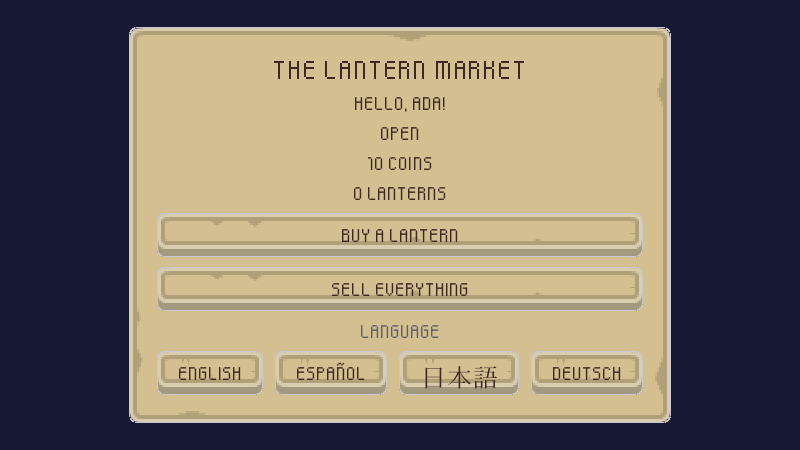
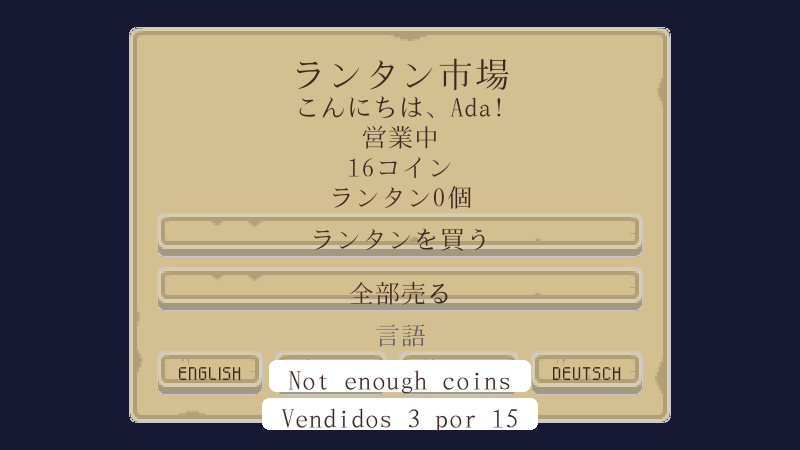
its page — is a lantern stall in English, Spanish and Japanese from lang.tsv and German
from lang/de.tsv, with its plurals, its placeholders, a context, and Japanese in Jigmo
(CC0), cut down to the letters the table uses.
Keeping the tables in step: rmp text#
rmp text scan     # add every text the game shows to resources/lang.tsv
rmp text check    # fail on a text a shipped language lacks, or gets wrong
rmp text scan reads the game's src/ and include/ for every
literal the framework translates — the first argument of the interface's text functions and of
rmp::Text, the .text, .placeholder and .items
of a kept widget, with the context an rmp::Text gives — the #line: ids
of the game's Yarn scripts, and what a
debug build drew that the tables lacked. It adds a row for each text that is not there, with the
words in the default language's column, and keeps every translation. A row nothing uses any more
is never deleted: it gets an x in its unused column, and the game and
rmp text check ignore it — in the per-language files too. The
language.name row is never marked: rmp::lang::name() reads it, and no
literal in the code does.
The texts a debug build drew and did not find are written, when the game ends, to
lang_seen.tsv next to the executable
([lang] collect), and
scan reads it from build/debug/: a text built in a way the scanner cannot
see still reaches the table, the first time somebody sees it on screen.
rmp text check holds the tables to [lang] languages, or to every
language they have: a text with no translation, a placeholder a translation lost or invented, a
plural with the wrong number of forms. Each mistake is a line with the file, the key and the
language. It is a stage of rmp test and a step of a game's CI, so a release cannot
ship a language with a hole in it.
What is not translated#
- The window's title,
[window]
title
, which is the game's name. - Any string made while the game runs, as above.
- Text the game draws with raylib itself (
DrawText()); pass it throughrmp::lang::translate()first.