Tilemaps
A level is designed in an editor and loaded by name. Every scene has a
map: the scene draws it under everything, stops
solid objects at its solid cells, and the enemies, coins and doors you placed in the editor turn
up in the game as objects. The editor stops being a file format and becomes the place where the
level is made.
Loading a level#
The map is a field of the scene. Assign it in _ready():
map = rmp::assets::load_map("world.ldtk");That is all it takes for the level to be on screen and solid. There is no draw() to
call: the scene draws the map first, inside the camera, so the objects stand on it and the HUD
your _draw() paints stays on top. A scene that never assigns its map — a menu — has an
empty one, which costs nothing.
load_map() picks the reader by the file's
extension:
| File | Editor | Status |
|---|---|---|
.ldtk | LDtk | The one the framework tests and keeps up to date. |
.json | Tiled | Read as it is, with the tests it has. It gets nothing new. |
LDtk is the primary one because it is the more modern editor — auto-layers, IntGrid, entities
with typed fields, worlds of many levels, and a JSON format it documents and has kept stable since
1.5 — and holding two readers to the same level of testing is more than it is worth. Whichever
made it, a map is the same rmp::Tilemap afterwards:
nothing past the parser knows which editor drew it.
A map is not shared the way a texture is. It belongs to one scene, moves rather than copies, and is read from the file each time it is loaded; the tileset images it draws with are ordinary textures and are shared.
What the scene does with it#
- Draws it
- Underneath every object, layer by layer from the bottom, inside the scene's
camera— and only what the camera shows. The scene hands the map the rectangle of the world in view, rotation, zoom and shake included, and the map looks only at the tiles that reach into it: an LDtk layer's through the 16 by 16 cell blocks it sorts them into when it is read, a Tiled layer's through the range of cells under the view. On a 400 by 400 cell map that is about 500 tiles of 320 000 a frame, 0.25 ms instead of 87, and the picture is the same pixel for pixel. Nothing is drawn ahead into a texture, so a map costs no memory beyond its own and changes nothing about how it is made. - Stops solid objects at its solid cells
- An object that is
solidand notimmovablecannot move into a solid cell: the floor holds the player up, a wall stops it, a ceiling ends a jump, and thePlatformerbehavior counts the floor as ground. A coin, a trigger, a bullet or a platform the game moves by hand is not stopped. - Becomes the edge of the world
- An object whose
edgessay what to do at the edge of the world — clamp, bounce, wrap — and whoseboundsare left empty takes the map's bounds as that edge rather than the view's, so a player clamped to the world is clamped to the level.
Movement against the map is worked out one axis at a time — across, then down — so a player
running along a floor made of separate tiles does not catch on the seams between them. A fast
object moves in steps of at most half a cell, so a fall faster than a tile per frame still lands
on the floor instead of passing through it. The camera is the one thing to set yourself, and it
is one line: camera.limits = map.bounds(); keeps the view inside the level.
Levels from LDtk#
An LDtk project can hold many levels. Without a name, load_map() loads the first;
with one, it loads the level of that identifier:
map = rmp::assets::load_map("world.ldtk", "Desert");Starting from "" — the first level, whatever it is called — means renaming or
reordering levels in LDtk does not stop the game starting at the beginning. A name the project
does not have loads nothing and the log lists the names it does have.
Setting up the project#
- Images next to it. The tileset images go in
resources/beside the.ldtk, or in a folder of their own: LDtk stores paths relative to the project, and they are read from the project's folder (maps/town.ldtkand../tiles/town.pngaretiles/town.png), or by the file's name at the top ofresources/when nothing is there. A tileset image that does not become a texture is a warning naming the file, and the level still loads with that tileset drawing nothing. The warning says which of two things happened: the image is not there, MAP: the tileset image … is not in resources/, or it is there and did not load, MAP: the tileset image … is in resources/ but did not load: it does not decode, or there is no window to upload it to yet — the file you can see, refused. A missing or broken image is also a failed load. A tileset must be a pictureload_texture()reads, such as a PNG; LDtk's built-in icon atlas has no file and draws nothing either. - Solid cells. An IntGrid layer value whose identifier is
solidmakes every cell painted with it solid. So does any tile taggedsolidthrough its tileset's enum for tile marking, even under another tile. Either is compared without case, because LDtk's default identifier style savessolidasSolid. - Layers. Tiles, AutoLayer, and IntGrid layers with an auto-layer ruleset are drawn, bottom to top, each with its own grid size, offset and opacity, every tile flipped and faded as LDtk placed it. A layer hidden in LDtk is not drawn and is still solid, which is the shape of a collision layer nobody needs to see.
- Levels in separate files. With "Save levels to separate files" on, each level
is a
.ldtklbeside the project; copy them intoresources/too. Loading a.ldtklon its own is refused, because its tilesets and layer definitions live in the.ldtk. - The format. The reader follows the JSON format of LDtk 1.5 and later. A project saved by an older LDtk is read anyway and says once that saving it again in a current LDtk is the fix.
Not read: level backgrounds, parallax, IntGrid values other than solid, and the
fields of a level itself.
The world#
In LDtk's GridVania and Free layouts every level has a place in one world, and the map keeps
it: bounds() is where the level sits in the
world, and every position the map hands out — objects, points, solid cells — is in those same world
units. A level loaded at x = 720 starts at 720, not at 0. The linear layouts have no
world, and each of their levels starts at 0,0.
That is what makes walking from one level into the next a single if.
neighbour_at(point) names the other
level of the world at a point, or "" while the point is still in this level or in no
level at all. Change to that level and put the player at the same position, which still means the
same place, because the coordinates are the world's:
class Level : public rmp::Scene {
public:
    Level(std::string name, Vector2 arrival) : _name(std::move(name)), _arrival(arrival) {}

private:
    void _ready() override {
        map = rmp::assets::load_map("world.ldtk", _name);
        _player = spawn<Player>({ .position = _arrival }).handle();
        camera.follow = _player;
        camera.limits = map.bounds();
    }

    void _update(float) override {
        if (!_player) return;
        const std::string_view next = map.neighbour_at(_player->position);
        if (!next.empty()) rmp::Scene::change<Level>(std::string(next), _player->position);
    }

    std::string _name;
    Vector2 _arrival;
    rmp::Handle<rmp::Object> _player;
};
Both
answers are std::string_views of the map's own text, good while the map is loaded,
which is why the next scene is handed a std::string of the name: by the time it
loads, this map is gone. level() is the
identifier of the level loaded. The platformer in examples/games/07_platformer
is a world of three levels side by side in a GridVania layout, walked through exactly like this:
level.cpp.
Objects from the editor#
An LDtk entity, or an object on a Tiled object layer, is a
rmp::MapObject: a type, a position, a size and a set
of properties. A factory says what to make of each type, and
spawn_objects() runs them all:
class LevelScene : public rmp::Scene {
    void _ready() override {
        map = rmp::assets::load_map("world.ldtk");
        map.on_object("Goblin", [](rmp::Scene &scene, const rmp::MapObject &o) {
            auto &goblin = scene.spawn<Goblin>({ .position = o.position });
            goblin.hp = o.property_int("hp", 20);
        });
        map.spawn_objects(*this);
        camera.limits = map.bounds();
    }
};
Three things in it matter:
on_object()is called afterload_map(). Factories belong to the map that is loaded when they are registered: on an empty map they register nothing, and the nextload_map()starts with none.- A second factory for the same type replaces the first. Two factories for one type is never what anybody means, and running both would spawn the object twice.
- The position is the centre, as it is for every
rmp::Object. The editors give a corner or a pivot; the conversion is done once, when the map is read, so no factory has to.
Properties#
LDtk's entity fields and Tiled's custom properties are read by name. Every accessor takes a fallback, which is what comes back when the object has no property by that name, when the field was left empty in the editor, or when it holds another kind of value:
| In LDtk | In Tiled | Read with |
|---|---|---|
| Int | int | property_int(key, fallback); a float is cut towards zero |
| Float | float | property_float(key, fallback); an int is read too |
| Bool | bool | property_bool(key, fallback) |
| String, Multilines | string, file | property_string(key, fallback) |
| Enum | property_string: the value's name | |
| Color | property_string: "#rrggbb" | |
| EntityRef | property_string: the iid of the entity it points at | |
| Point | property_point(key): the world position of the centre of that cell | |
| Array<Point> | property_point(key, i) for each i below property_count(key) |
A point comes back in the same world units as position, so a patrol route drawn in
LDtk is used as it comes:
map.on_object("Bat", [](rmp::Scene &s, const rmp::MapObject &o) {
    auto &bat = s.spawn<Bat>({ .position = o.position });
    bat.speed = o.property_float("speed", 50);
    for (int i = 0; i < o.property_count("patrol"); ++i) {
        bat.route.push_back(o.property_point("patrol", i));
    }
    if (bat.route.empty()) bat.route.push_back(o.position);
});
Not read: arrays of anything but points, and the FilePath and Tile field types.
Linking objects to each other#
Every LDtk entity has an iid, a unique
identifier, and an EntityRef field holds the iid of the entity it points at. Making
the link is up to the game: keep the iid on the object, and compare.
map.on_object("Key", [](rmp::Scene &s, const rmp::MapObject &o) {
    auto &key = s.spawn<Key>({ .position = o.position });
    key.opens = o.property_string("opens"); // the iid of a Door
});
map.on_object("Door", [](rmp::Scene &s, const rmp::MapObject &o) {
    auto &door = s.spawn<Door>({ .position = o.position });
    door.iid = o.iid;
});
The
key and the door keep std::strings, and not what the map hands them: a
MapObject's names and the text of its properties are std::string_views of
the parsed map, good while the map is loaded, which is all of spawn_objects().
An iid also outlives the scene, which makes it the way to remember that a coin was
collected or a door opened when the player walks back into a level: the platformer keeps the
iids of what is gone in an rmp::global and
skips them in its factories.
Objects with no factory#
A type nobody registered still comes out, as a plain invisible
rmp::Object with the position and the size, immovable. Whether it is solid depends on
what it was:
- A Tiled object with an area — a rectangle drawn on an object layer — is solid. That is the right default for a wall or a platform drawn as a shape.
- A Tiled point, or anything with no width or no height, is a marker and is not solid: an invisible collider at a spawn point is not what anybody drew.
- An LDtk entity is never solid on its own. Its box is only how big it looks in the editor; walls in LDtk are IntGrid.
Levels from Tiled#
A Tiled map is the .json Tiled saves. What the reader expects of it:
- CSV tile layers. A map whose layers are compressed or base64 is refused, and the log says where the setting is: Map, Map Properties, Tile Layer Format, CSV. CSV is Tiled's default for a new map.
- Tilesets embedded, or saved as JSON. A tileset kept in a
.tsxfile is XML, which is not read: embed it in the map, or save the tileset as.tsj. Until then that tileset draws nothing, none of its tiles are solid, and the load counts as failed. The tileset image is looked up by its file name inresources/. - Solid tiles. Every tile of a layer whose class is
solidis solid; so is a tile the tileset gives a bool propertysolidset to true. - Objects. The object's class is its
type, its name isname, androtationandgidare Tiled's. Rectangles, ellipses, points and polygons are placed by their top-left corner and tile objects by their bottom-left, and both arrive at their centre. Objects come out in the order the layer has them.
Tiled maps have no world: level() and neighbour_at() answer
"", and the map starts at 0,0.
Asking the map#
The scene uses the map for drawing and collision; the same questions are open to the game, in world units:
| Call | Answers |
|---|---|
solid_at(point) | Whether a solid cell is under a point, on any layer. |
solid_in(rect) | Whether a solid cell covers any part of a rectangle. Every cell under it is checked, not only the corners. Touching is not covering: a box standing on the floor is not in the floor. |
tile_at(layer, column, row) | The tile in one cell of one layer, as its global tile id; 0 for an empty cell. Layers count from 0 at the bottom, and the cell is in that layer's own grid. For LDtk it is the topmost tile of the cell. |
bounds() | The level's rectangle in the world. |
tile_size() | One cell of the map's grid. |
layer_count(), object_count() | How many tile layers and how many objects it holds. |
An enemy that turns round at the edge of its platform, rather than walking off it, asks whether there is floor just ahead of its feet:
// Walking right: is there anything to stand on one pixel ahead and one below?
const Rectangle body = world_collider();
const Vector2 ahead{ body.x + body.width + 1, body.y + body.height + 1 };
if (!scene().map.solid_at(ahead)) velocity.x = -velocity.x;
draw() is public for a game that wants the
map drawn somewhere else in its own order; draw(area) draws only the tiles that reach
into area, a rectangle of the world, which is how the scene draws it. The scene already
draws it, so calling it as well draws it twice.
// A minimap of the room the player is in, in a game that draws its own.
map.draw(Rectangle{ 0, 0, 320, 180 });
Which cells are solid is worked out once, when the map is read — an LDtk IntGrid value called
Solid, a tile tagged Solid, a Tiled layer or tile marked solid all go into
one table — so solid_at() and solid_in() are a lookup each, as cheap on the
hundredth question of a frame as on the first. The walk to a cell of that table is what
rmp::find_path() searches.
A whole level, from the platformer#
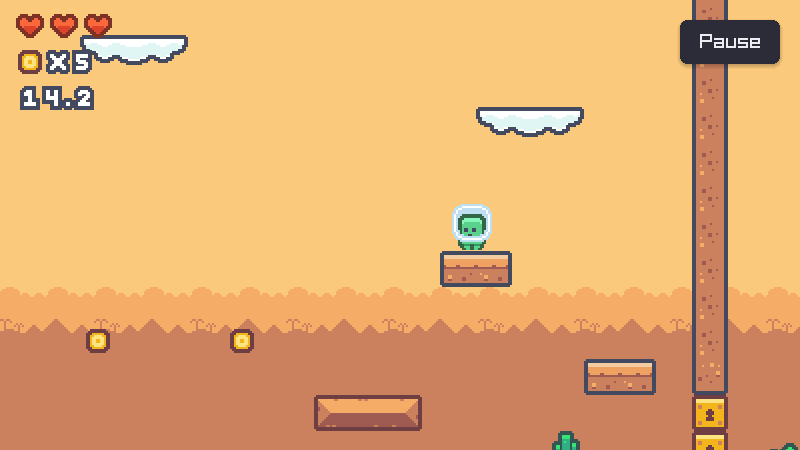
examples/games/07_platformer is built on one
LDtk project, examples/games/07_platformer/resources/world.ldtk: three levels —
Meadow, Desert and Snowfield — side by side in a GridVania world, an IntGrid layer called
Collisions whose one value is Solid, a tileset whose enum tags mark the solid tiles,
and entities with fields: coins with a value, walkers and bats with a
patrol route of points, a moving platform with a to point, a key whose
opens is an EntityRef to its door, signs with text and an arrow enum. This is the
scene that plays any one of those levels, whole — loading it, a factory per entity, the camera,
and the walk into the next level:
// ---------------------------------------------------------------------------
// One level of the world: load it, build what LDtk placed in it, and watch the
// player leave it -- into the next level, or off the bottom.
// ---------------------------------------------------------------------------

#include "game.h"
#include "objects.h"

#include <rmp/assets.h>
#include <rmp/audio.h>
#include <rmp/input.h>
#include <rmp/tilemap.h>
#include <rmp/ui.h>

#include <algorithm>
#include <utility>

namespace game {

namespace {
// A sign's picture: plain, or with the arrow LDtk's `arrow` Enum asks for.
int sign_tile(std::string_view arrow) {
    if (arrow == "Left") return tiles::SIGN_LEFT;
    if (arrow == "Right") return tiles::SIGN_RIGHT;
    return tiles::SIGN;
}
} // namespace

LevelScene::LevelScene(std::string level, Entry entry)
    : _level(std::move(level)), _entry(entry) {}

void LevelScene::_ready() {
    // "" is the first level of the world, whatever LDtk calls it: rename or
    // reorder the levels there and the game still starts at the beginning.
    map = rmp::assets::load_map("world.ldtk", _level);
    rmp::audio::music("music"); // already playing after a level change: not restarted
    // Not Space, not Enter: those are the jump's and the menus'. Defining it
    // again in the next level replaces it, never adds to it.
    rmp::input::action("pause", KEY_ESCAPE, KEY_P, GAMEPAD_BUTTON_MIDDLE_RIGHT);

    // The player first, so that what is built below can know who it is.
    auto &player =
        spawn<Player>({ .position = _entry.position, .velocity = _entry.velocity });
    _player = player.handle();

    // ---- what LDtk placed, one factory per entity -------------------------
    //
    // Anything already collected, stomped or opened in this run is in
    // run().gone by its iid, and is simply not built again.

    map.on_object("Player", [this](rmp::Scene &, const rmp::MapObject &o) {
        if (!_entry.carried) _player->position = o.position;
    });
    map.on_object("Coin", [](rmp::Scene &s, const rmp::MapObject &o) {
        if (contains(run().gone, o.iid)) return;
        auto &coin = s.spawn<Coin>({ .position = o.position, .layer = 1 });
        coin.iid = o.iid;
        coin.value = o.property_int("value", 1);
    });
    map.on_object("Walker", [](rmp::Scene &s, const rmp::MapObject &o) {
        if (contains(run().gone, o.iid)) return;
        auto &walker = s.spawn<Walker>({ .position = o.position, .layer = 2 });
        walker.iid = o.iid;
        walker.speed = o.property_float("speed", 40);
        walker.stompable = o.property_bool("stompable", true);
        // The route is drawn in LDtk as Points; a walker keeps to its floor
        // and only needs to know where to turn.
        walker.left = walker.right = o.position.x;
        for (int i = 0; i < o.property_count("patrol"); ++i) {
            const float x = o.property_point("patrol", i).x;
            walker.left = std::min(walker.left, x);
            walker.right = std::max(walker.right, x);
        }
    });
    map.on_object("Bat", [](rmp::Scene &s, const rmp::MapObject &o) {
        if (contains(run().gone, o.iid)) return;
        auto &bat = s.spawn<Bat>({ .position = o.position, .layer = 2 });
        bat.iid = o.iid;
        bat.speed = o.property_float("speed", 50);
        for (int i = 0; i < o.property_count("patrol"); ++i) {
            bat.route.push_back(o.property_point("patrol", i));
        }
        if (bat.route.empty()) bat.route.push_back(o.position);
    });
    map.on_object("MovingPlatform", [this](rmp::Scene &s, const rmp::MapObject &o) {
        auto &platform = s.spawn<Platform>({ .position = o.position });
        platform.collider = rmp::rect(o.size);
        platform.from = o.position;
        platform.to = o.property_point("to", o.position);
        platform.speed = o.property_float("speed", 40);
        platform.rider = _player;
    });
    map.on_object("Key", [](rmp::Scene &s, const rmp::MapObject &o) {
        if (contains(run().gone, o.iid)) return;
        auto &key = s.spawn<Key>({ .position = o.position, .layer = 1 });
        key.iid = o.iid;
        key.opens = o.property_string("opens");
    });
    map.on_object("Door", [](rmp::Scene &s, const rmp::MapObject &o) {
        if (contains(run().gone, o.iid)) return;
        auto &door = s.spawn<Door>({ .position = o.position });
        door.collider = rmp::rect(o.size);
        door.iid = o.iid;
    });
    map.on_object("Spikes", [](rmp::Scene &s, const rmp::MapObject &o) {
        // Only the points hurt: the bottom eight pixels, a little in from the ends.
        auto &spikes = s.spawn<Spikes>({ .position = o.position });
        spikes.collider = rmp::rect({ o.size.x - 4, 8 });
        spikes.collider.offset = { 0, (o.size.y / 2) - 4 };
    });
    map.on_object("Sign", [](rmp::Scene &s, const rmp::MapObject &o) {
        auto &sign = s.spawn<Sign>({ .position = o.position, .layer = -1 });
        sign.text = o.property_string("text");
        sign.tile = sign_tile(o.property_string("arrow", "None"));
    });
    map.on_object("Goal", [](rmp::Scene &s, const rmp::MapObject &o) {
        s.spawn<Goal>({ .position = o.position });
    });
    map.spawn_objects(*this);
    _start = _player->position;

    // ---- the camera ----------------------------------------------------------
    camera.follow = _player;
    camera.limits = map.bounds(); // the level's own rectangle, in the world
    camera.smoothing = 10;
    camera.zoom = ZOOM;
}

void LevelScene::_update(float delta) {
    if (_over) return;
    if (rmp::input::just_pressed("pause")) {
        rmp::Scene::push<PauseScene>(); // this scene freezes under it, clock and all
        return;
    }
    run().seconds += delta;

    const auto player = _player.get();
    if (!player) return;

    // THE NEXT LEVEL. Out of this one and into another of the world: change
    // to it, and arrive at the same world position going the same way.
    const std::string_view next = map.neighbour_at(player->position);
    if (!next.empty()) {
        _over = true;
        rmp::Scene::change<LevelScene>(std::string(next),
                                       Entry{ true, player->position, player->velocity });
        return;
    }

    // No level there. The sides of the world are walls; below is a fall.
    const Rectangle b = map.bounds();
    if (player->position.x < b.x || player->position.x > b.x + b.width) {
        player->position.x = std::clamp(player->position.x, b.x, b.x + b.width);
        player->velocity.x = 0;
    }
    if (player->position.y > b.y + b.height + 48) {
        lose_life();
        if (!_over) respawn();
    }
}

void LevelScene::lose_life() {
    if (_over) return;
    Run &r = run();
    --r.lives;
    camera.shake(5, 0.35f);
    rmp::audio::play("hurt");
    if (r.lives > 0) return;
    _over = true;
    rmp::audio::music("lose", false);
    rmp::Scene::push<EndScene>(false, false);
}

void LevelScene::respawn() {
    if (const auto player = _player.get()) {
        player->position = _start;
        player->velocity = Vector2{};
    }
}

void LevelScene::win() {
    if (_over) return;
    _over = true;
    const bool record = keep_if_best(run().coins, run().seconds);
    rmp::audio::music("win", false);
    rmp::Scene::push<EndScene>(true, record);
}

// The HUD, in screen space: hearts, coins and the clock down the left, drawn
// from the same tiles as the world and at its scale -- however the window
// stretches it -- and the Pause button at the right.
void LevelScene::_draw() {
    const float scale = camera.raylib().zoom; // screen pixels to a pixel of the art
    for (int i = 0; i < 3; ++i) {
        const int heart = i < run().lives ? tiles::HEART : tiles::HEART_EMPTY;
        draw_icon(heart, { (6 + (static_cast<float>(i) * 17)) * scale, 4 * scale },
                  scale);
    }
    draw_icon(tiles::COIN, { 6 * scale, 22 * scale }, scale);
    draw_icon(tiles::TIMES, { 20 * scale, 22 * scale }, scale);
    draw_number(run().coins, { 32 * scale, 22 * scale }, scale);
    draw_seconds(run().seconds, { 6 * scale, 40 * scale }, scale);

    // A phone has no Escape: the one way to pause there is a finger. The
    // interface knows this scene is being played -- the player reads Space,
    // the arrows and the A button through rmp::input -- so the button takes
    // no focus, and Space jumps rather than pressing it (FrameOptions'
    // focus_first, in rmp/ui.h).
    rmp::ui::begin({ .placement = rmp::ui::Align::TOP_RIGHT });
    if (rmp::ui::button("Pause")) rmp::Scene::push<PauseScene>();
    rmp::ui::end();
}

} // namespace game
When a map cannot be read#
A map that is missing or does not parse is an empty map:
valid() is false, every query answers zero,
empty or false, and on_object() registers nothing. The game runs, on a level with
nothing in it. Each reason is said in the log in words that name the file and the fix — the
compressed layers, the .tsx tileset, the level LDtk keeps in a file that is not in
resources/, the level name that is not in the project. A map file that is missing,
or does not parse, counts as a failed
load, and so does a tileset image that is not there or does not decode, so the boot check in CI
sees them.